Improve code quality at the source.

Empower developers to write better tests and better code with easy-to-use tools that work where you do.

  • Quickly see what areas of code are high risk
  • Write better tests
  • Catch bugs earlier, reduce broken builds
  • Reduce project risk and cost
  • Improve communication
  • Maintain consistent quality standards
  • Use metrics to help the team transition to agile

Scroll Down to Learn More!

Solutions built for your entire development process.

See exactly what your team needs to get the best results out of NCover.

Development Manager + NCover Code Central

When a Dev Team uses NCover, it gives Dev Managers all the tools they need to stay informed, drive quality minded development, and keep key stakeholders informed. All of this is made possible by Code Central’s powerful features:

  • View easy to understand metrics for individual developers and build servers
  • Roll up project data, see overviews and trends at a glance, and drill down where needed
  • Share progress with any manager at any level
Instant access to company wide development metrics,
helps Dev Managers keep projects on track.

Build Servers + NCover Collector + Code Central

NCover Collector will automatically collect coverage data and send all available metrics to Code Central for viewing and analysis.

  • Simple installation and configuration
  • Low maintenance investment over time
  • Data and metrics are sent NCover Code Central for easy access and analysis
  • Collect data on multiple servers, but view all project metrics on Code Central
  • Works with physical or virtual machines
  • Critical for transitioning to continuous integration, or improving your existing CI efforts
Make sure your team is gathering all available coverage data
by putting NCover Collector on your build servers.

Development Teams + NCover Desktop

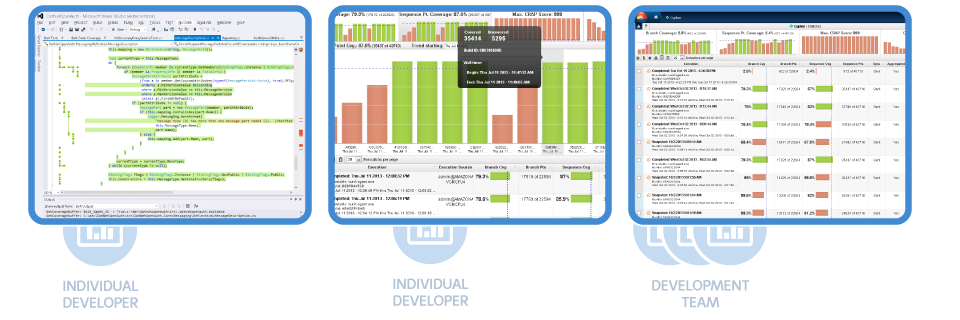
Developers are the front line of attack when it comes to high quality, bug free software. NCover Desktop is specifically designed to help guide developer’s testing efforts to deliver high quality software that meets or exceed project, team, and organizational goal.

  • Microsoft Visual Studio plug-in enhances productivity
  • Multiple metrics and code highlighting provide insight
  • CRAP score and filters show you where your time is best spent
  • High powered breadcrumb makes browsing code a breeze
  • Branch visualization makes complex code paths easy to understand
  • Simple, fast, “out of the way” operation
NCover Desktop allows developers to quickly find high
risk code and attack with better tests to meeting
quality standards as efficiently as possible.

Reduce the risk of outsourced development.

NCover ensures that code has been tested to help ensure quality work.

Satisfactory thresholds ensure the code is up to agreed upon standards.

Outsourcing development may be necessary for your team to deliver products on time or within budget, but that doesn’t mean that quality must suffer. Time, location, and language barriers can conceal flaws in code that may not be properly tested, or thoroughly reviewed. Requiring outsourced companies to use NCover and meet quality thresholds helps increase the quality of the code at the end of a project.

Does your company provide development services?

Build trust and customer confidence by providing NCover metrics to your clients. Download the “NCover Tested” badge and put it on your website, to separate you from your competitors and to let everyone know you are committed to measurable quality.

Outsourced and distributed teams are able to send updates and reports with ease, ensuring that managers and clients understand the progress of testing at
any stage in the project.
Explore by Product or by Role

NCover Code Central allows your entire team access to product overviews down to individual.

Learn More

NCover Code Central allows your entire team access to product overviews down to individual.

Learn More

QA Teams - Make sure that your entire development process is fully accounted for.

Learn More